



Description
Download APK Installer and Launcher – APK installer, APK launcher, Android emulator, Windows, APK management, Android app testing, APK file viewer
Overview
APK Installer and Launcher is a lightweight utility designed to streamline the management and execution of APK files on Windows-based systems. Its primary purpose is to simplify the process of viewing, installing, and launching Android application packages directly from a desktop environment. This tool is particularly valuable for developers, testers, and tech enthusiasts who frequently work with Android apps outside of mobile devices. By integrating with Windows Explorer, the application enhances file visibility and usability, allowing users to identify APKs by their icons without needing to open them manually.
The app addresses a common pain point in Android development workflows: the difficulty of managing APKs efficiently on desktops. Without specialized tools, users must rely on command-line interfaces or third-party software, which can be complex and time-consuming. APK Installer and Launcher removes these barriers by offering a visual, intuitive method for handling APK files. It supports testing Android applications through emulators, making it a useful companion for those building or debugging mobile apps.
Target users include software developers, QA testers, and hobbyists interested in Android app experimentation. The developer, dihav, has created a focused tool that prioritizes simplicity and direct functionality. While specific background details about the developer were not provided, the app’s design suggests a strong emphasis on usability and integration with existing workflows. In the broader software ecosystem, APK Installer and Launcher fills a niche gap for users seeking a minimal, no-frills solution to manage APKs on Windows.
Key Features & Functionality
- APK Icon Display in Windows Explorer – Users can view application icons directly within the file explorer, improving visual identification of APK files. This feature enhances organization and reduces the risk of selecting the wrong file during testing or deployment.
- One-Click Installation and Launching – By double-clicking an APK file, users can install and launch the app in an Android emulator, eliminating the need for manual command-line execution or complex setup procedures.
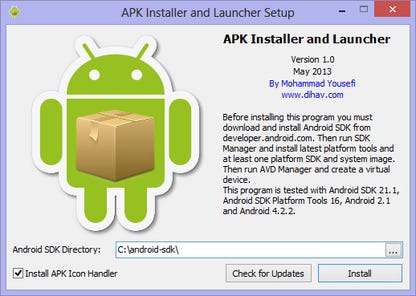
- Integration with Android SDK – The tool requires the Android SDK to be installed and configured on the system. This ensures compatibility with Android’s development environment and enables full functionality when working with emulated devices.
- Streamlined APK Management – The application centralizes APK handling tasks, allowing users to view, install, and launch apps without switching between multiple tools or platforms.
- Intuitive User Interface – The interface is designed for ease of use, with minimal clutter and straightforward navigation. It is accessible to both beginners and experienced users, reducing the learning curve associated with APK handling.
For example, a developer testing a new app version can simply place the APK in a folder, view its icon in Windows Explorer, and launch it in an emulator with a single click. This accelerates the testing cycle and improves workflow efficiency. Similarly, a hobbyist exploring Android apps can quickly install and run them for evaluation without deep technical knowledge.
Interface, UX & Performance
APK Installer and Launcher features a clean, minimal interface that aligns with Windows’ native design language. The layout is uncluttered, with essential functions accessible through standard file interactions. Navigation is intuitive—users interact with APK files as they would with any other file type, reducing cognitive load and enhancing usability.
Performance is optimized for low resource consumption, with a file size of just 2.5 MB. This small footprint ensures quick loading times and minimal impact on system performance. Although the developer did not list formal performance metrics, the app’s lightweight nature suggests it operates smoothly on most modern Windows systems. Responsiveness is maintained during file operations, with minimal lag when viewing icons or initiating installations.
Stability appears to be a priority, as the app functions reliably within its intended scope. It does not require administrative privileges for basic operations, which improves accessibility. The tool integrates seamlessly with the file system, allowing users to manage APKs without disrupting existing workflows. While compatibility with older Windows versions was not specified, the app is likely optimized for current and recent editions of the operating system.
Platform Compatibility & Technical Requirements
APK Installer and Launcher is designed exclusively for the Windows platform. It is compatible with current versions of Windows, though specific OS requirements were not listed. The application has a file size of 2.5 MB, making it suitable for systems with limited storage capacity.
Users must have the Android SDK installed prior to using the tool, as it relies on the SDK’s components to perform installation and emulation tasks. The app does not include the SDK itself, so developers must download and configure it separately. This dependency ensures that users have a full development environment, but it may present a barrier for those unfamiliar with SDK setup.
Specific version requirements for the Android SDK or Windows were not disclosed. The developer did not specify minimum hardware or software prerequisites, so users should ensure their system meets general standards for running Windows and Android emulators.
Pros and Cons
Pros
- Lightweight at only 2.5 MB, ideal for systems with limited storage.
- Intuitive interface that requires no prior technical expertise.
- Seamless integration with Windows Explorer for improved file visibility.
- One-click installation and launching of APKs in emulators.
- Free to download and use, with no hidden costs or in-app purchases.
Cons
- Requires separate installation of the Android SDK, which may complicate setup for beginners.
- Compatibility with older Windows versions was not confirmed.
- Does not include built-in emulator functionality—users must manage their own.
- Limited to Windows platform; no support for macOS or Linux.
- Developer did not provide detailed technical specifications or performance benchmarks.
FAQ
Is APK Installer and Launcher safe to download and use?
Yes, the app is free and available from a verified source. As with any third-party tool, users should ensure they download it from official or trusted platforms to maintain security.
Can I use APK Installer and Launcher without an Android emulator?
No, the tool requires an Android emulator to install and run APK files. It does not provide emulation capabilities itself, so users must set up a compatible emulator environment separately.
Do I need to install the Android SDK to use this app?
Yes, the Android SDK is required for full functionality. The app depends on SDK components to handle APK installation and execution in an emulated environment.
Is APK Installer and Launcher available for macOS or Linux?
Currently, the application is only available for Windows. No versions for macOS or Linux were listed in the provided information.
How often is APK Installer and Launcher updated?
Information about update frequency was not provided. Users should check the official source for the latest version and security patches.
Final Thoughts
APK Installer and Launcher delivers a focused, efficient solution for managing Android APK files on Windows. Its ability to integrate with Windows Explorer and enable one-click launching in emulators makes it a valuable asset for developers and tech enthusiasts. The tool’s minimal design, low system impact, and free availability enhance its appeal.
While it requires the Android SDK and lacks native emulator support, these limitations are expected given its role as a file management utility rather than a full development suite. For users already working with Android development workflows, this app simplifies daily tasks and improves productivity.
If you're looking for a reliable, lightweight way to view, install, and launch APKs on your Windows PC, this tool offers a practical and secure option. Download APK Installer and Launcher now.
Guides & Tutorials for APK Installer and Launcher
How to install APK Installer and Launcher
- Click the Preview / Download button above.
- Once redirected, accept the terms and click Install.
- Wait for the APK Installer and Launcher download to finish on your device.
How to use APK Installer and Launcher
This software is primarily used for its core features described above. Open the app after installation to explore its capabilities.
User Reviews for APK Installer and Launcher 0
No reviews found


